
The SmarTruck system’s live tracking feature provides real-time data on various parameters of registered trucks, enabling efficient monitoring and decision-making.
Accessing the Feature
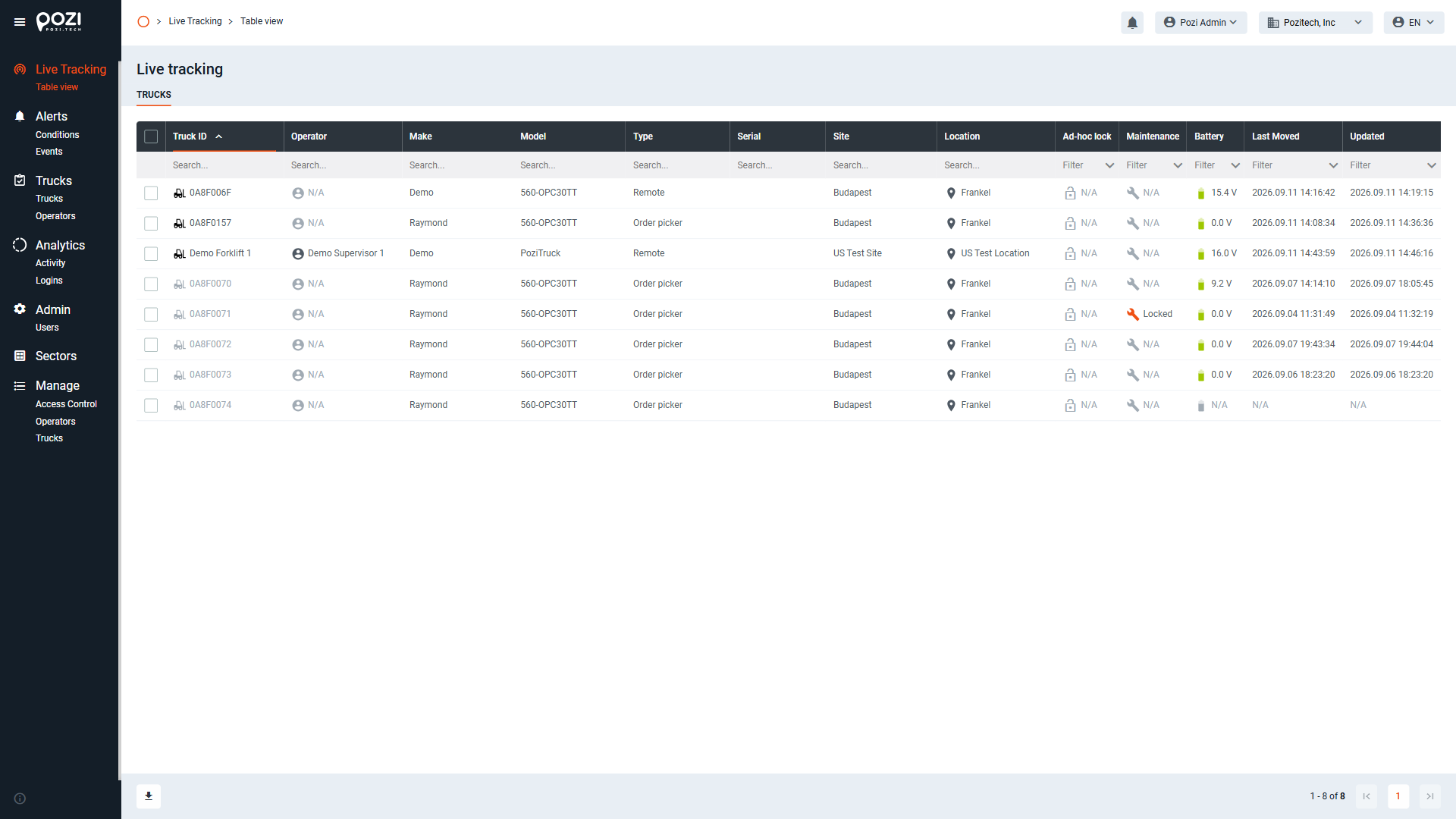
You can access the live tracking feature by clicking the first item in the main menu on the left side of the screen.
By default, this screen is displayed immediately after login.
Data Display and Management
Every table across the SmarTruck web interface supports the same sorting, searching, and filtering behavior described below in Table View: you can sort ascending or descending by clicking a column header, and each column has its own search or filter field. In addition, every table includes an export/download option, available in the bottom-left corner of the screen.
Table View
You can sort the data in ascending or descending order by clicking on the column headers, where applicable.
Each column has a search or filter field at the top:
- Search Field: Enter text or numbers to search for specific information.
- Filter Field: Columns labeled “filter” allow you to set various filtering options, similar to spreadsheet programs.
Exporting Data
Data can be exported in different formats using the buttons at the bottom of the screen:
- XLSX Export
- CSV Export
- PDF Export
This functionality makes it easy to save and share data for external analysis.