
Introduction
This document contains the user manual for Wireless Charging Station for SmarTag GNSS EX.
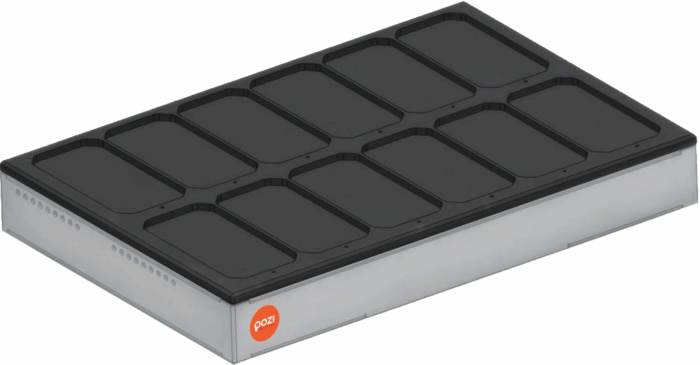
The Wireless Charging Station is a charging station that provides dedicated wireless charging for 12 SmarTag GNSS EX units simultaneously. This design not only provides a space-saving solution but is also easily scalable to needs. The charging station is a standalone unit, requiring only a connection to the main power line for operation.
Installation
To install the charging station, connect the provided power cable to the standard (IEC60320) socket located on the back of the device and then to the mains. The Wireless Charging Station can be turned on/off using the rocker switch next to the power connector, which is illuminated when on.
Charging
The Wireless Charging Station wirelessly charges the SmarTag GNSS EX units (QI-compatible). Wireless charging greatly simplifies the tasks related to picking up and returning the SmarTag GNSS EX units, as charging starts automatically by simply placing them in their dedicated slots.
Another benefit of wireless charging technology is the robustness of the units. Due to the absence of sockets and connecting cables (i.e., contact), there is no risk of failure from dirt and wear caused by increased use, and the surface of the charger is easily cleanable with various chemicals.
The charging status of the SmarTag EX units is indicated by the LEDs located at each slot:
| Status | LED indicator |
| No SmarTag GNSS EX unit in the slot | Off |
| SmarTag GNSS EX unit in the slot is charging | Blue |
| Charging paused in all slots due to overheating | Red |
The Wireless Charging Station automatically controls the speed of the built-in cooling fans based on the temperature data measured at various points to ensure the charger operates correctly within the full temperature range specified on the datasheet.
Due to the nature of the charging process, the charging electronics associated with certain slots may switch off and then on again (in this case, the LED indicator will temporarily be off, even though there is a SmarTag GNSS EX unit in the slot). This behavior is part of the normal operation, which is controlled by the control unit built into the charging station, depending on the charging process.
Although there are no connectors or switches on the device housing, with the help of an optionally available device, SmarTag GNSS EX units can be switched off without draining the built-in battery, making it easy to prepare them for safe storage or transport in a matter of seconds while maintaining a charge level ready for use.
Troubleshooting
Sometimes the charging stops beyond normal operation; in such cases, it is recommended to restart the entire charging station (complete power off and back on). If such an action does not solve the issue, a few simple steps can be taken to narrow down the source:
- If the SmarTag GNSS EX unit causes a red LED indicator in another slot as well (while the correct operation is verified with another SmarTag GNSS EX unit), probably the SmarTag GNSS EX unit is faulty. Its further use should be suspended, and the issue should be reported to the operator.
- If the SmarTag GNSS EX unit is functioning correctly in another slot, the specific slot of the Wireless Charging Station is likely faulty. Its further use should be suspended, and the issue should be reported to the operator.